CLICK HERE

Tuesday, 2 August 2011

Internet Cyclone 2.10 - Increase internet speed up to 200%


Internet Cyclone - is a powerful, easy-to-use, Internet Optimizer  / Internet Accelerator for Windows 95, 98, ME, NT, 2000 and XP designed to automatically optimize your Windows settings which will boost yourInternet connection speed up to 200%. Internet Cyclone is compatible with all modems and high speed LAN, ISDN, CABLE, DSL, T1 or other connections. This software will still be useful to you after upgrading your Internet connection.

Using this software you will gain guaranteed faster Internet speed for the time you're online. Surfing, downloading files, emailing, playing online games, and anything else you do online will be faster. This is an excellent software for slow dial-up modems as well as high speed access connections.


What can Internet Cyclone offers to you ?

  • Internet Cyclone optimizes your Windows settings automatically in order to increase internet speed or you can customize them manually.
  • You can speed internet connection without changing your Hardware.
  • Works with all Browsers.
  • It is compatible with all Dial-Up modems and high speed LAN, CABLE, DSL, DSL (PPPoE), T1 or other internet connections.
  • nternet Cyclone will speed up web surfing, online gaming, e-mailing, chat and video conference and it will even speed up downloads.

How does this work ?

While the actual maximum transfer speed of your Internet connection cannot be changed except by upgrading your hardware, Internet Cyclone can increase the performance of your existing modem/network hardware by optimizing Windows modem/network settings to maximize the efficiency of your current hardware. By default, your Windows PC does not manage Internet connections as optimally as possible.

Internet Cyclone is designed to automatically change many registry settings in Windows such as: Maximum Transmission Unit (MTU), Maximum Segment Size (MSS), Time To Live (TTL), TCP Receive Window (Rwin), Cache Size (NDI), PMTU Black Hole Detect, PMTU Auto Discovery (PAD), Session Keep Alive (SKA) and some Windows Extra settings like: Selective Acknowledgement (SACK), Maximum Duplicate Acknowledge (Max DupAcks), Large Window Scaling, Ports COM, VCache value, Combuffer value, Internet Explorer settings, Maximum connection per server and many other values in order to increase internet speed.


How much speed can you gain with Internet Cyclone ?

It will not make your 56k dial-up modem connection to 100k. If your Internet connection speed is a 56k dial-up modem, it will allow you to use it with the best performance. For example we were informed by other people that this Internet optimizer helped them to boost their high speed Internet connections up to 120kb/s (this means a boost of 400%).

click here for free download 

Windows Live Movie Maker 2011 free download


 Movie-making magic
With Windows Live Movie Maker, you can quickly turn your photos and videos into polished movies. Add special effects, transitions, sound, and captions to help tell your story. And sharing with friends and family is easy—whether on the web, a computer, TV, mobile device, or a DVD.
 Add videos and photos
Easy to edit

click here for download

Microsoft Office 2010 free download

Express your ideas more visually.

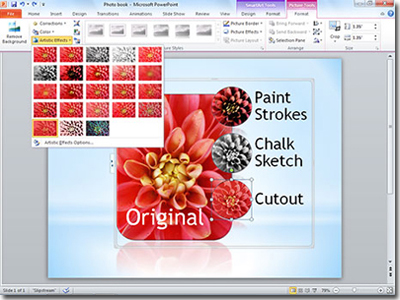
Office 2010 opens up a world of design options to help you express your ideas with more impact. New and improved picture formatting tools, such as color saturation and artistic effects, let you transform your visuals into works of art. And a wide range of new customizable themes and SmartArt® graphic layouts offer more ways to make your ideas stick.

Accomplish more when working together.

Brainstorm ideas, keep versions in sync, and meet deadlines faster when you’re working in groups. Co-authoring in Word 2010, PowerPoint 2010, Excel Web App, and OneNote 2010 shared notebooks enable you to edit the same file at the same time with other people — even when they’re in different locations.

Enjoy the familiar Office experience from more locations and devices.

With Office 2010, you can get things done on your schedule.
  • Microsoft Office Web Apps. Extend your Office 2010 experience to the Web. Store your Word, Excel, PowerPoint, and OneNote files online and then access, view, edit, and share content from virtually anywhere.2
  • Microsoft Office Mobile. Stay current and respond quickly using new mobile versions of Office applications designed specifically for your Windows Phone 7 device.3
  • Microsoft SharePoint Workspace 2010. Synchronize SharePoint 2010 lists and libraries with SharePoint Workspace, formerly known as Microsoft Office Groove, so you can access, view, and edit files anytime and anywhere from your computer. Everything will automatically sync to the SharePoint server when you’re back online.

Stay connected to your business and social networks.

Outlook 2010 is your hub for colleagues, customers, and friends. Use Outlook Social Connector to quickly view history of e-mails, meetings, or attachments you receive from individuals. Get additional information about people to stay on top of your business and social circles through SharePoint My Site, Windows Live, or other popular third-party sites.

Get your message out instantly.

Broadcast your PowerPoint presentation to a remote audience, whether or not they have PowerPoint installed.4 The new PowerPoint Broadcast Slide Show feature enables you to present right from your desk, while your audience views the presentation live in their Web browser.

Create powerful data insights.

Track and highlight important trends with new data analysis and visualization features in Excel 2010. The new Sparklines feature delivers a clear and compact visual representation of your data through small charts within worksheet cells. Slicers let you filter and segment your PivotTable data in multiple layers so you can spend more time analyzing and less time formatting.

Manage large volumes of e-mail with ease.

Save valuable time by streamlining your inbox. Outlook 2010 lets you compress long e-mail threads into a few conversations that can be categorized, prioritized, and conveniently filed. The new Quick Steps feature lets you perform multi-command tasks, such as reply and delete, with a single click.

Deliver compelling presentations.

Captivate your audience with personalized videos in your presentations. Embed and edit videos directly in PowerPoint 2010. Trim, add fades and effects, or bookmark key scenes. Videos inserted from your files are now embedded by default, so you can share your dynamic presentations without having to manage separate media files.

Store and track all of your ideas in one place.

Get the ultimate digital notebook for tracking, organizing, and sharing text, pictures, and audio and video files with OneNote 2010. New features such as page version tracking, automatic highlighting, and Linked Notes give you more control over your information, so you’re always on top of your content and changes made by others.

Work your way, faster and more easily.

Microsoft Office Backstage™ view replaces the traditional File menu to give you a centralized space for all of your file management tasks, including save, share, print, and publish. The enhanced Ribbon, common across Office 2010 applications, lets you access commands quickly and create or customize tabs to fit your work style.

click here for download